
Building a strong security foundation doesn’t have to drain your budget. In this first installment of our “Back to Basics” series, we’ll cover simple, low‑cost steps any organization can take to discover what devices and systems are on its network. By gaining visibility, you dramatically reduce blind spots that attackers love to exploit.
Why Know What’s on Your Network?
- You can’t secure what you can’t see. With remote work, cloud services, and bring‑your‑own‑device policies, your “network” now spans offices, home routers, and public clouds.
- Insider and outsider risks. Rogue devices—whether a malicious implant or a forgotten guest router—can grant attackers a foothold inside your defenses. Regular network visibility helps spot unauthorized access.
- Resource constraints. Not every organization has a dedicated security operations center. Starting with free or low‑cost tools gives you a head start, even with minimal staffing.
Core Principle: Regular Network Discovery
A simple daily or weekly scan can reveal new or unexpected devices. When something appears that wasn’t there before, follow up:
- Authenticate whether the device belongs to your IT inventory.
- Investigate unknown hardware—an employee’s personal router or a hidden LAN Turtle could pose serious risks.
- Document changes to build a baseline of normal network behavior over time.
Tool Spotlight: Nmap (Network Mapper)
Nmap is the go‑to free tool for network discovery and service enumeration. It works on Windows, macOS, and Linux—and even offers a graphical front end (Zenmap) for newcomers.
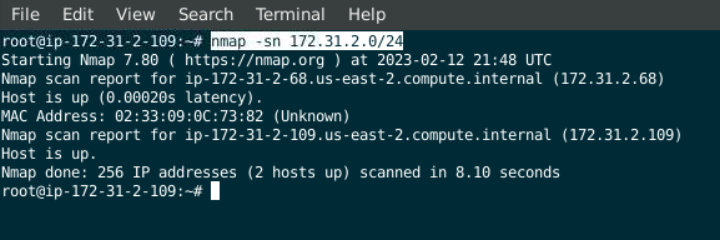
Automating Scans
- Schedule Nmap in a cron job or task scheduler.
- Export results to XML or CSV for trend analysis in spreadsheets or SIEM tools.
- Integrate scans into simple Python or PowerShell scripts for alerts when new devices appear.
Extending Visibility into the Cloud
- Cloud‑native discovery: Tools like AWS Config, Azure Resource Graph, or Google Cloud’s asset inventory provide a free (or low‑cost) way to list running instances, storage buckets, and network interfaces.
- API‑driven checks: Leverage cloud provider APIs to automate asset inventory and compare against your approved resource list.
Best Practices for “Doing More with Less”
- Baseline your network: Run initial scans to establish what’s normal, then focus on deviations.
- Leverage existing infrastructure: Use built‑in router logs, DHCP leases, and directory services for complimentary device data.
- Document and communicate: Share scan schedules and findings with IT and leadership to reinforce security awareness.
What’s Next?
In the next article, we’ll shift from devices to identities—showing you how to audit user accounts, service principals, and API keys that have access to your systems. Visibility into “who” is as important as “what.”
For more practical advice on cybersecurity fundamentals and modern security tools, subscribe to The Audit podcast on YouTube.
Stay grounded, stay secure.